Chemical Weapons In World War I

 Information  Comments Off on Chemical Weapons In World War I
Jul 132017
 

Chemical Weapons In World War I

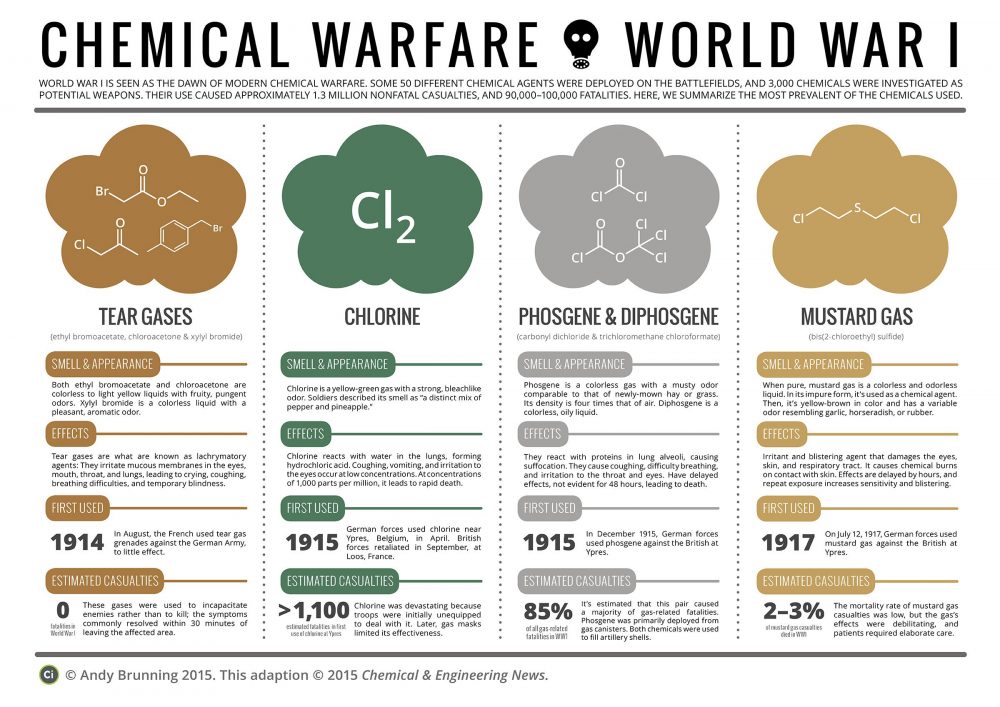
Although the use of toxic chemicals as weapons dates back thousands of years, the first large scale use of chemical weapons was during World War I. They were primarily used to demoralize, injure, and kill entrenched defenders, against whom the indiscriminate and generally very slow-moving or static nature of gas clouds would be most effective. The types of weapons employed ranged from disabling chemicals, such as tear gas, to lethal agents like phosgene, chlorine, and mustard gas. This chemical warfare was a major component of the first global war and first total war of the 20th century. The killing capacity of gas was limited, with only about 90 thousand fatalities from a total of some 1.2 million casualties caused by gas attacks. Gas was unlike most other weapons of the period because it was possible to develop effective countermeasures, such as gas masks. In the later stages of the war, as the use of gas increased, its overall effectiveness diminished. The widespread use of these agents of chemical warfare, and wartime advances in the composition of high explosives, gave rise to an occasionally expressed view of World War I as “the chemist’s war” and also the era where “weapons of mass destruction” were created.
The use of poison gas performed by all major belligerents throughout World War I constituted war crimes as its use violated the 1899 Hague Declaration Concerning Asphyxiating Gases and the 1907 Hague Convention on Land Warfare, which prohibited the use of “poison or poisoned weapons” in warfare.

 

Box Breathing

 Information  Comments Off on Box Breathing
Jul 112017
 
Box breathing is a technique used in taking slow, deep breaths. This can heighten performance and concentration while also being a powerful stress reliever.

Box Breathing
Breathe in sync with this.

This Navy SEAL breathing technique, aka box breathing or tactical breathing, is used to calm yourself down, a simple 4 second rotation of breathing in, holding, breathing out, holding.

A perfect visual meditation for when you can’t listen to audio, or just need a quick second to refocus.

Use this image to help you keep time! :)

Here are the directions:
  1. Inhale for 4 seconds (as the circle expands)
  2. Hold your lungs full for 4 seconds (as the circle stays fully expanded)
  3. Exhale for 4 seconds (as the circle shrinks)
  4. Hold your lungs empty for 4 seconds (as the circle is contracted)

That’s it!

Repeat for as many times as you need to calm down.


via

Trivia About The Bald Eagle

 Amusing, Information  Comments Off on Trivia About The Bald Eagle
Jul 042017
 
Ten Independence Day Items of Trivia About The Bald Eagle:Trivia About The Bald Eagle
Test Your Family
  1. Benjamin Franklin, John Adams and Thomas Jefferson served on the committee that picked the eagle for the national seal [Franklin wanted the turkey].
  2. Bald eagles have few natural enemies and live only in North America.
  3. Bald eagles get their white head and tail feathers about 4/5 years of age.
  4. Bald eagles are not, and never were bald. The term comes from when “bald” meant “white-headed”.
  5. Their maximum speed: 40 mph or over 100 mph while in a dive.
  6. They can lift roughly half their body weight.
  7. The Bald Eagle is no longer considered endangered, and now only threatened.
  8. The only other kind of eagle in North America is the golden eagle.
  9. Bald eagles mate for life, but if one dies, the survivor will accept a new mate.
  10. It is a felony to shoot an eagle.


A Definitive List of What Those F1 – F12 Keys Do

 Information  Comments Off on A Definitive List of What Those F1 – F12 Keys Do
Jun 282017
 

Finally! Now you can stop wondering. Here is the answer.

A Definitive List of What Those F1 – F12 Keys Do

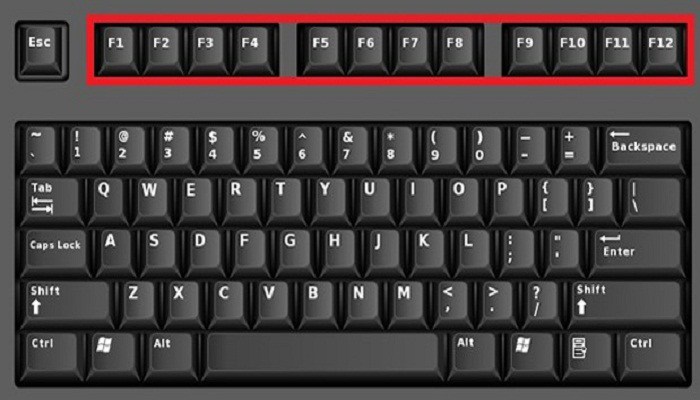
Haven’t you always wondered what those little keys at the top of your keyboard do? You’ve probably only used them to adjust your volume or screen brightness, but they actually do a lot more. Keep in mind that some of these keyboard shortcuts are different depending on the type of computer you have. You are also able to change these features, and some computers come with pre-set functions for these keys that you have to change manually. So before slamming the keyboard in frustration trying to get them to work, go into your settings and see how your computer has been set up. Pressing the fn button with the F keys will typically enable them to work.

Here’s the answer to the mystery of those F keys. You’ll be surprised by how much they can do.

F1

  • Opens help menu when pressed with Windows button
  • Hides/displays ribbon menu in Excel and Word when hit with Control button

F2

  • Alt + Ctrl + F2 opens Document Library in Microsoft Office
  • Allows you to edit the selected folder or file name in Windows Explorer

F3

  • Opens search feature in Windows Explorer
  • Shift + F3 lets you change from lowercase to uppercase to all caps in Word
  • Opens find feature in Firefox and Chrome

F4

  • Alt + F4 closes window
  • Places the cursor in the address bar in Explorer

F5

  • Starts slideshow in PowerPoint
  • Refreshes Internet browser pages
  • Opens Find and Replace in Microsoft Office

F6

  • Goes to the next page in a split screen in Microsoft Word
  • Ctrl + F6 lets you easily switch between Word documents

F7

  • Alt + F7 does a spelling and grammar check in Microsoft Word
  • Shift + F7 open Thesaurus in Microsoft Word

F8

  • In Excel, enables extend mode for arrow keys
  • Enables safe mode in Windows

F9

  • Ctrl + F9 inserts empty fields into Word
  • Updates fields in Word

F10

  • Opens menu bar
  • Ctrl + F10 maximizes window in Word
  • Shift + F10 does the same thing as a right click

F11

  • Exits and enter full screen mode in browsers
  • Shift + F11 adds a new spreadsheet in Excel

F12

  • Opens Save As in Word
  • Shift + F12 saves Word document
  • Ctrl + F12 opens Word document


via